PAKFUN Game Download New Latest Earning APP For Pakistan
11MB
V1.0
Android 5+
NEW
Description
Finding a mobile gaming platform is easy, but understanding what you are downloading is more important. Pakistani users often search for game names, APK files, registration details, and login instructions before trying a new application. PAKFUN Game is a name worth checking carefully when exploring this type of mobile entertainment.
Before downloading anything, there is one important detail to understand: publicly available listings use the name PAKFUN GAME in connection with several different gaming applications. This does not establish that PAKFUN is one specific standalone game with a confirmed game library or official APK. SLOTGAME+1 Therefore, this guide focuses on understanding the name, checking an application, Android installation, account access, and safety instead of making unsupported promises.

What Is PAKFUN Game?
PAKFUN Game is a name that appears in searches related to mobile gaming platforms and Android applications in Pakistan. Some third-party gaming listings use PAKFUN GAME as a developer or publisher label rather than the actual title of an individual game.
This difference matters. A developer name and an app name are not always the same thing. For example, a listing may display a particular game title while showing PAKFUN GAME in its developer information. Users should check the actual application name, publisher, website, and package details before deciding which app they want to install.
For someone exploring PAKFUN Game for the first time, the best approach is to identify the exact platform. Check whether the application has an official website, clear contact information, understandable terms, and a consistent identity. Do not assume that every website using the PAKFUN name belongs to the same service.
Why Do Pakistani Users Search for PAKFUN Game?
Android gaming is convenient because people can explore different applications directly from their smartphones. However, users also want clear information before installing an unfamiliar app.
Some common reasons people search for PAKFUN Game include:
- APK information: Understanding where an application comes from.
- Android compatibility: Checking whether it supports their smartphone.
- Account access: Finding registration and login instructions.
- Game information: Learning what entertainment options are actually available.
- Privacy: Understanding how personal information is handled.
- Installation support: Fixing common APK installation problems.
These are reasonable questions. A useful gaming guide should answer them honestly rather than simply encouraging users to download an unknown file.
PAKFUN Game Features and User Experience:
The exact features of a standalone PAKFUN Game application could not be independently confirmed from reliable information. As a result, it would be misleading to promise specific games, rewards, payment methods, or account facilities.
Instead, users should examine the following areas when checking an application carrying this name.
Application Interface:
Start by checking the main screen. A properly presented application should make its navigation understandable. Important sections, account options, settings, and help information should be easy to locate.
Available Gaming Options:
Check the actual game selection before creating an account. Do not rely only on promotional images or descriptions published by unrelated websites.
Account Management:
If registration is available, check which details the platform requests. A legitimate service should explain why it needs personal information and how it handles account security.
Mobile Performance:
A good mobile experience should be easy to navigate on smaller screens. Check whether buttons respond properly, text remains readable, and the application works without repeated errors.
Customer Support:
Look for a genuine support channel and clear terms of service. Having a contact page is not proof that an application is trustworthy, but missing or unclear support information is a reason to be cautious.
How to Download PAKFUN Game APK on Android:
If you identify a genuine PAKFUN application and its official download source, follow these general Android installation steps.
- Open Chrome or another trusted browser on your Android phone.
- Visit the verified website belonging to the application.
- Find the correct Android download option.
- Check the application name and file information before downloading.
- Wait until the APK file finishes downloading.
- Open your phone’s Downloads folder.
- Tap the APK file to begin installation.
- If Android requests permission, allow installation from that specific browser only when you trust the source.
- Follow the installation instructions.
- Review the app permissions before opening the application.
Do not download a file simply because its name contains PAKFUN. APK websites can use similar names, and a familiar logo does not prove that a file is genuine.
PAKFUN Game Android Compatibility:
Android compatibility depends on the application’s actual requirements. There is currently no independently verified minimum Android version or confirmed device requirement for a standalone PAKFUN Game app.
Before installation, check these basic points:
- Your Android operating system meets the app’s stated requirements.
- Your phone has enough available storage.
- Your internet connection is stable.
- Your device has the latest available security updates.
- The downloaded file comes from a trustworthy source.
Older smartphones may experience installation or performance problems when an application requires newer Android features.
iPhone users should also remember that APK files are designed for Android. Never install an Android APK through an unfamiliar website claiming to provide an iOS version.
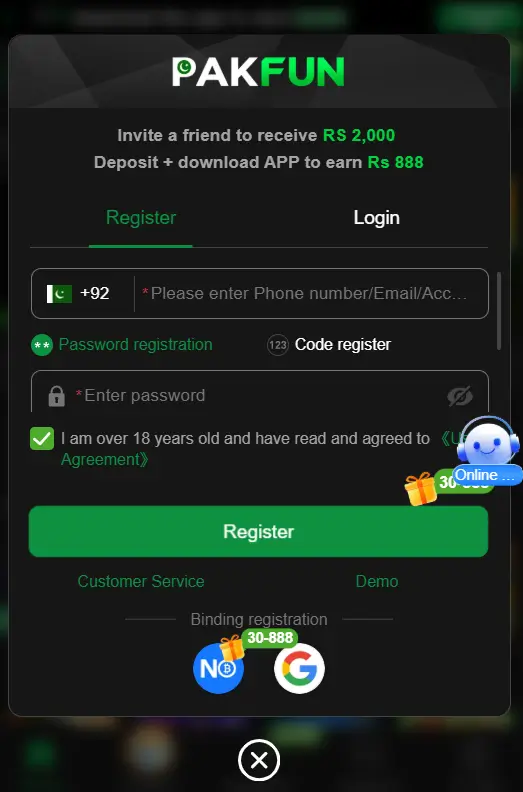
PAKFUN Game Registration and Login Guide:
Registration and login options depend on the particular application you identify. If it provides an account system, follow the instructions displayed by its verified official platform.
Registration Process:
- Open the verified application.
- Find the Sign Up or Register option.
- Read the registration requirements.
- Enter only the information that is genuinely required.
- Complete phone or email verification if available.
- Create a strong, unique password.
- Read the platform’s terms before submitting your details.
Never share your verification code or password with another person.
PAKFUN Login Process:
If you already have an account, look for the Login option and enter the registered details. Make sure you are using the correct application and website before entering your credentials.
If login fails, check your internet connection, confirm your details, and use the official password recovery option if one exists.
Common PAKFUN Game Problems and Their Solutions:
| Problem | What to check |
|---|---|
| APK not installing | Check Android compatibility and storage |
| Download interrupted | Try a stable internet connection |
| App not opening | Restart your phone and check updates |
| Login unsuccessful | Verify your account details |
| Verification code missing | Check your network and SMS inbox |
| App showing errors | Contact the verified platform support |
Do not repeatedly download files from different websites to fix an installation problem. First confirm that you have the correct application.
Is PAKFUN Game Safe to Use?
Safety should be a priority whenever you install an application outside the Google Play Store. An APK file can request permissions or access information that is not necessary for its main purpose.
Before using PAKFUN or any similarly named application, consider these precautions:
- Scan downloaded files with Google Play Protect.
- Check the publisher and official website.
- Avoid files distributed through unknown links.
- Do not provide unnecessary personal information.
- Never share banking passwords, OTPs, or wallet PINs.
- Read privacy policies and account terms.
- Avoid applications that promise guaranteed income or winnings.
Also, real-money or chance-based gaming can involve financial losses. Never treat promotional rewards or advertised earnings as guaranteed income. Check applicable Pakistani laws before using any real-money gaming service.
Advantages and Limitations of PAKFUN Game:
The advantages depend on the exact application rather than the PAKFUN name alone.
Potential advantages:
- A straightforward mobile interface.
- Clear installation instructions.
- Easy-to-understand game rules.
- Transparent privacy information.
- Accessible customer support.
Limitations and things to verify:
- The exact standalone application is not confirmed.
- Official APK details are not independently established.
- Device compatibility may vary.
- Available games and account features require verification.
- Safety and payment claims should not be accepted without evidence.
Final Words:
PAKFUN Game is a name Pakistani Android users may encounter while exploring mobile gaming applications. However, identifying the correct application should come before downloading or creating an account. Check its publisher, official website, installation requirements, privacy policy, and available features carefully.
A little research can prevent unnecessary installation problems and reduce the risk of sharing personal information with an unreliable platform. Most importantly, avoid guaranteed earning claims and never spend money that you cannot afford to lose. A safe and informed approach is always better than rushing into a new gaming application.
FAQs:
What is PAKFUN Game?
PAKFUN Game is a name associated with mobile gaming application listings. Users should identify the exact app and publisher because the name may appear as a developer label rather than a standalone game.
How can I download PAKFUN Game?
First, identify its verified official website and check the Android download information. Download an APK only when you can verify its source and authenticity.
Is PAKFUN Game available for Android?
Some third-party gaming listings display PAKFUN GAME as a developer name. However, the Android requirements of a specific PAKFUN application need to be confirmed separately.
How do I create a PAKFUN account?
If your selected application supports registration, open its verified version and follow the on-screen instructions. Use accurate information and create a strong password.
What should I do if PAKFUN login is not working?
Check your internet connection, confirm your login details, and look for an official account recovery option. Contact verified support if the problem continues.